
User guides
The City Nature Challenge is based on participatory science, one of the most important platforms of which is iNaturalist. iNaturalist is free and non-commercial. Originally created by graduate students at the University of California Berkeley, the application is now used throughout the world to document biodiversity observations. All research-grade observations containing shareable photographs or sound recordings on iNaturalist will be transmitted to the Global Biodiversity Information Facility (in Denmark) via iNaturalist.org (in the United States) to help advance international biodiversity research. The application may be used all year long to record your biodiversity observations, mais especially during the four days of the challenge every end of April.


Why use iNaturalist and participate in the City Nature Challenge?
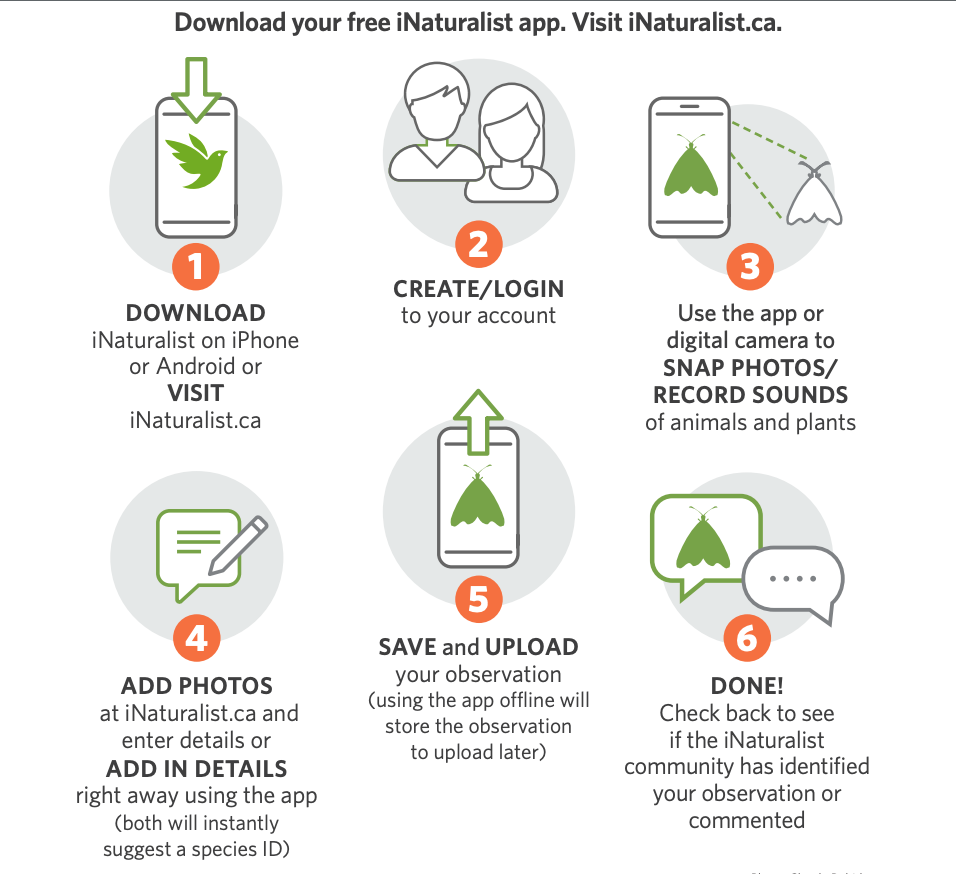
How can I upload an observation (using the iNaturalist application or on the web)?
Useful links and iNaturalist resources
Getting Started with iNaturalist
https://www.inaturalist.org/pages/getting-started-inaturalist-canada
General Information
Video Tutorials
FAQ – iNaturalist
https://www.inaturalist.org/pages/help-inaturalist-canada-en
Tips on Photography and Bioblitzes
For Campuses Participating in the City Nature Challenge
How to make an observation on campus (Campus Biodiversity Network/Vanier College)
Consultez les diapositives de notre session d’information (en français)
Consult our information session slides here (in English)
Some quick tips:
In Canada, iNaturalist is managed by the Canadian Wildlife Federation (iNaturalist.ca); at the global level, iNaturalist is managed by the National Geographic Society and the California Academy of Sciences (iNaturalist.org). To facilitate visibility of Canadian projects, we recommend that when using the web for uploading or creating projects that you choose iNaturalist.ca instead of iNaturalist.org.
 DNU-CNC Grand Montréal